
Stream Everything
with Ursa IPTV
Unlock a universe of entertainment with over 140,000+ live channels, movies, and series in stunning 4K UHD. Zero buffering. Instant activation.
Choose The Ursa IPTV Plan That Suits You
Experience premium entertainment with the best streaming plans.
1 Month
- 140,000+ Live Channels
- 100,000+ VOD & Series
- 4K / FHD / HD Quality
- Catch Up / EPG
- FREE Updates
- 99.9% Server Uptime
- All Devices Are Supported
- AntiFreeze Technology
- 24/7 Technical Assistance
3 Months
- 140,000+ Live Channels
- 100,000+ VOD & Series
- 4K / FHD / HD Quality
- Catch Up / EPG
- FREE Updates
- 99.9% Server Uptime
- All Devices Are Supported
- AntiFreeze Technology
- 24/7 Technical Assistance
6 Months
- 140,000+ Live Channels
- 100,000+ VOD & Series
- 4K / FHD / HD Quality
- Catch Up / EPG
- FREE Updates
- 99.9% Server Uptime
- All Devices Are Supported
- AntiFreeze Technology
- 24/7 Technical Assistance
12 Months
- 140,000+ Live Channels
- 100,000+ VOD & Series
- 4K / FHD / HD Quality
- Catch Up / EPG
- FREE Updates
- 99.9% Server Uptime
- All Devices Are Supported
- AntiFreeze Technology
- 24/7 Technical Assistance
All The TV You Love In Ursa IPTV
Access every major streaming platform — all in one subscription. From blockbusters to originals, we bring them all to you.
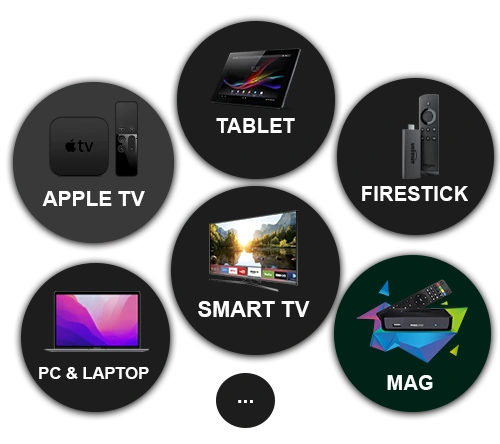
Watch Ursa IPTV on Any Device
Experience flawless streaming with Ursa IPTV — the best IPTV service on all your favorite devices. From Smart TVs and Firestick to Apple TV, MAG Boxes, Tablets, and PCs, enjoy smooth HD & 4K viewing anytime, anywhere. One subscription keeps you connected and entertained across every platform — effortless, uninterrupted, and instant.
What Our Customers Say
Join thousands of satisfied customers streaming with Ursa IPTV.
Frequently Asked Questions
Have questions? We've got answers. Here are some of the most common questions about our Ursa IPTV service.
About Ursa IPTV
Ursa IPTV is a premium IPTV subscription service that provides access to over 140,000 live TV channels and 100,000+ movies and series on demand. We deliver content in stunning 4K, Full HD, and HD quality with our proprietary anti-freeze technology, ensuring a smooth and buffer-free viewing experience on any device.
IPTV (Internet Protocol Television) is a technology that delivers television content over the internet instead of traditional cable or satellite. With Ursa IPTV, you simply connect your device to the internet, install a compatible player app (like IPTV Smarters or TiviMate), enter your login credentials, and start streaming thousands of channels and on-demand content instantly.
Ursa IPTV provides access to content through internet streaming technology. The legality of IPTV services varies by country and region. We recommend our users to familiarize themselves with their local laws and regulations regarding streaming services. We do not host any content on our servers.
Ursa IPTV works worldwide! Our service is available in over 50 countries with optimized servers across North America, Europe, Middle East, Asia, Africa, and Latin America. We recommend using a stable internet connection of at least 15 Mbps for the best HD experience, and 25 Mbps for 4K content.
Devices & Installation
Ursa IPTV is compatible with virtually all modern devices including: Amazon Firestick & Fire TV, Smart TVs (Samsung, LG, Sony, TCL), Android phones & tablets, iPhones & iPads (iOS), Windows & Mac computers, Apple TV, MAG boxes (250/254/256/322), Enigma2 receivers, and Android TV boxes. You can use apps like IPTV Smarters Pro, TiviMate, or any M3U-compatible player.
Setting up Ursa IPTV on your Firestick is easy: 1) Go to Settings > My Fire TV > Developer Options and enable "Apps from Unknown Sources". 2) Install the Downloader app from the Amazon App Store. 3) Open Downloader and enter the IPTV Smarters Pro APK URL. 4) Install the app and open it. 5) Enter your Ursa IPTV credentials (username, password, and server URL provided in your activation email). 6) Start streaming! The whole process takes under 5 minutes.
For Samsung Smart TVs, download IPTV Smarters from the Samsung App Store. For LG Smart TVs, use the SS IPTV or IPTV Smarters app from the LG Content Store. Open the app, select "Xtream Codes API" as the login type, and enter your Ursa IPTV credentials. You'll have access to all channels and VOD content within seconds.
For Android: Download IPTV Smarters Pro or TiviMate from the Google Play Store. For iOS (iPhone/iPad): Download IPTV Smarters from the Apple App Store. Open the app, choose "Xtream Codes API" login, and enter the server URL, username, and password from your activation email. That's it — you're ready to stream!
Download and install VLC Media Player (free) from videolan.org. Open VLC, go to Media > Open Network Stream, and paste your Ursa IPTV M3U playlist URL. Alternatively, you can use IPTV Smarters for Windows for a more user-friendly interface with EPG guide and favorites management.
On Apple TV, open the App Store and download the IPTV Smarters app. Launch the app, select "Xtream Codes API", and enter your Ursa IPTV login details. The app supports full EPG guide, favorites, catch-up TV, and multi-screen viewing on Apple TV 4K.
On your MAG Box: 1) Go to Settings > System Settings > Servers > Portals. 2) In Portal 1 Name, type "Ursa IPTV". 3) In Portal 1 URL, enter the portal URL provided in your activation email. 4) Save and restart the box. The channel list will load automatically. MAG 250, 254, 256, 322, and 324 are all supported.
For Enigma2 devices (Dreambox, VU+, etc.): Connect to your receiver via FTP or SSH. Upload the M3U playlist file to the /etc/enigma2/ directory. Install the XtreamTV or E-Channelizer plugin. Restart the receiver and your Ursa IPTV channels will appear in the channel list.
Billing & Account
Ursa IPTV accepts a variety of secure payment methods including: Credit/Debit cards (Visa, Mastercard, American Express), PayPal, cryptocurrency (Bitcoin, USDT), bank transfers, and mobile payment options. All transactions are processed through secure, encrypted payment gateways.
Your Ursa IPTV subscription is activated instantly after payment confirmation! You will receive an email within seconds containing your login credentials (username, password, and server URL). During high-demand periods, activation may take up to 15 minutes maximum.
Our standard plans include 1 device connection. You can install the app on unlimited devices, but only one can stream at a time per connection. If you need multiple simultaneous connections (for family members, multiple TVs, etc.), we offer multi-device plans for 2, 3, or 4 simultaneous connections at discounted rates on our pricing page.
Ursa IPTV offers a money-back guarantee on all plans. Our 1-month plan includes a 1-day money-back guarantee, and our 3, 6, and 12-month plans include a 7-day money-back guarantee. If you're not completely satisfied with our service, contact our support team via WhatsApp for a full refund within the guarantee period.
Yes! Ursa IPTV offers a 24-hour free trial with full access to all 140,000+ channels and 100,000+ VOD content. No credit card is required — simply contact us via WhatsApp and we'll set up your trial account within minutes. This way you can test the quality, speed, and reliability before purchasing.
You can renew your Ursa IPTV subscription at any time by contacting us via WhatsApp or email. Your existing credentials will remain the same — we simply extend your subscription period. We recommend renewing before expiration to avoid any service interruption.
Technical & Troubleshooting
For optimal streaming quality, we recommend: 10 Mbps for SD channels, 15 Mbps for HD channels, 25 Mbps for Full HD (1080p), and 50 Mbps for 4K Ultra HD content. Our adaptive bitrate technology automatically adjusts the stream quality based on your available bandwidth to prevent buffering.
If you experience buffering: 1) Check your internet speed (speedtest.net). 2) Restart your router and device. 3) Switch from Wi-Fi to a wired Ethernet connection if possible. 4) Clear the app cache. 5) Try a different player app. 6) Use a VPN if your ISP is throttling IPTV traffic. If the issue persists, contact our 24/7 support team via WhatsApp for immediate assistance.
Yes! Ursa IPTV includes a comprehensive 7-day EPG (Electronic Program Guide) for most channels. The EPG shows current and upcoming programs, descriptions, and schedules. It works automatically with compatible apps like IPTV Smarters Pro and TiviMate.
While a VPN is not required to use Ursa IPTV, we recommend using one for added privacy and to prevent ISP throttling. Top VPN choices for IPTV include: NordVPN, ExpressVPN, and Surfshark. Make sure to connect to a server closest to your location for the best speeds.
Ready to Start Streaming with Ursa IPTV?
Get instant access to 140,000+ live channels and 100,000+ movies in stunning 4K quality. Start with a free 24-hour trial today!
Contact Us on WhatsApp